
WoW Forever
Forever One Button
Action Panel grid for WoW Forever with its own suggestion engine: priority lists, burst, interrupts, defensives and pre-combat reminders on your own action buttons. You press every key yourself.
Screenshots
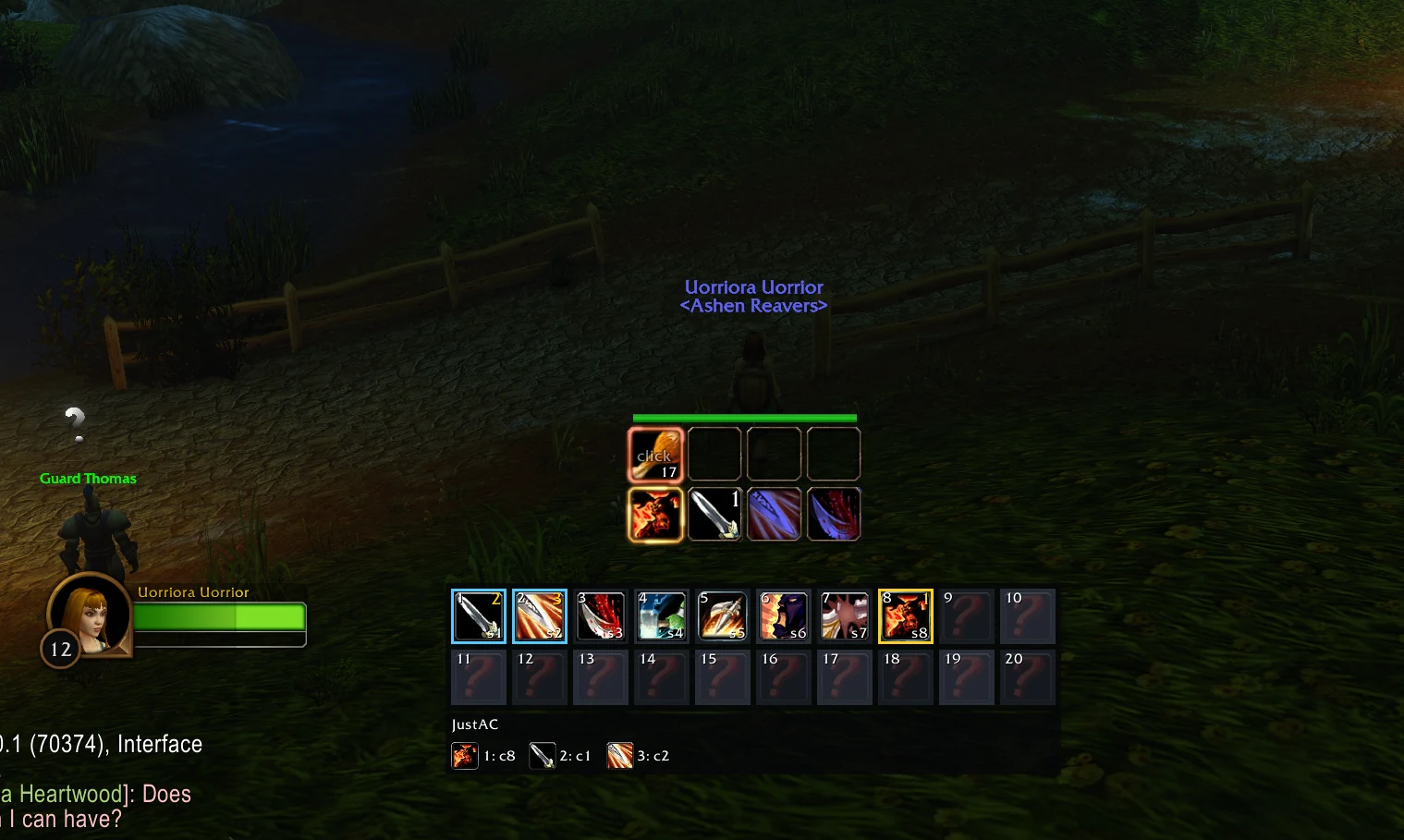
What's newv1.1.3
- Pixel reader: the short black after each cast of the suggested spell now stays on screen for at least 60 ms, as the protocol says. It was timed from the start of the game frame, while the cast arrives later in the frame, so it could last only 40-58 ms and a pixel reader could miss it. Colours and timings are otherwise unchanged.
Release history
v1.1.2
Release page- The addon has its own icon in the AddOns list instead of the question mark.
v1.1.1
Release page- Spells that only work on some creatures are no longer suggested on the others: Exorcism and Holy Wrath only on undead and demons, Turn Undead and Shackle Undead on undead, Banish, Enslave Demon, Hibernate, Scare Beast, Soothe Animal, Polymorph and Sap on their own creature types. Their cell turns grey on a target they cannot affect.
- When the game refuses a cast with "Invalid target" or "Immune", that spell is no longer suggested against that kind of creature until the next /reload. A hit that lands as "Immune" after a successful cast is not detected (the combat log is not available to addons on Forever).
v1.1.0
Release page- Cooldowns on the panel: while a cell's cooldown runs, its icon is greyed out under a cooldown swipe (the global cooldown is not shown). This works in combat too, where Forever hides cooldown timers, and right after the cast or the potion, when the panel used to show the action as ready again. The suggestions follow the same rule: an action on cooldown is no longer suggested as ready in the moment after you use it.
- Readiness at a glance: a blue icon means not enough mana, rage or energy, a grey icon that the action cannot be used right now (wrong stance, no target, Execute not available). Item cells show how many you carry.
- The action to use now stands out: its cell has a gold frame, a large "1" and a pulsing glow, and the first icon of the queue strip is larger and framed. Upcoming actions that are not ready yet keep a grey number and no frame.
- Countdown numbers on the swipe follow the client option Show numbers for cooldowns.
v1.0.2
Release page- Spell ranks, all classes: a newly learned rank now replaces the old one in its cell. Before, a rank still sitting on the hidden Blizzard bar kept the cell (and the suggestion) on that rank, so a level-19 character could still be casting rank 1. Every spell cell, also the ones you placed and also with automatic filling off, now uses the highest rank you know.
- Critical health: below 30 % health in a fight, a healing spell on a cell (the class's first ready one, else your healing potion or healthstone) takes position 1, with a green frame, and the diagnostic pixel shows its cell. Options Combat: on/off and the threshold (10-60 %).
v1.0.1
Release page- Options window: the engine features no longer run past the bottom of the window. They are now on two pages, Combat and Reminders, with the buttons and values in their own column so no label is covered.
v1.0.0
Release pageFirst public release for WoW Forever.
- Built-in suggestion engine, no other addon needed: priority lists for all nine classes and their talent trees (single target, cleave, aoe). The list follows the tree you spent the most talent points in.
- Leveling lists from level 1 to 59 that grow with every ability you learn; the level-60 lists from 60.
- Conditions that work with Forever's hidden combat values (rage, energy, mana, buffs, DoTs, cooldowns, stances, combo points, enemy count): an unknown value never holds a suggestion back.
- Only your tree's list is suggested, so the panel never bounces between stances; when you are in the wrong stance, it tells you which one to use.
- A clear "wait" when nothing can be pressed; Charge when you are out of melee; DoTs and Sunder Armor are not suggested again while they last.
- Burst cue: a ready big cooldown moves to position 2 (purple frame).
- Interrupts: an icon left of the grid shows the interrupt, the enemy's cast and your key (red "!" on the cell); crowd control on casts that cannot be kicked.
- Defensive column right of the grid: cooldowns, potions and healthstones ordered by how hurt you are, the big ones held until you need them; pet heal and revive.
- Clickable reminders out of combat: class buffs, flasks and elixirs, Well Fed food, scrolls, weapon stones and oils, shaman imbues, stealth, and food, drink or bandages after a fight.
- Action panel of up to 20 secure buttons that fill themselves and never move; you bind and press every key. Your best healing item gets a cell that follows what is in your bags.
- Every feature can be switched in the options (
/fob, Features page) or with/fob feature <name> on|off. - License: GPL-3.0-or-later. Priority and class data from Just Assisted Combat (wealdly, GPL-3.0), whose level-60 lists derive from wowsims (MIT).